New Year Savings: 40% off for your first 3 months — ends soon, don't miss out!

Claim 40% Off

New Year Savings

Claim 40% Off
Scheduling

Schedule jobs and manage your crew effortlessly

Running a lawn care or field service business means juggling dozens of jobs, multiple crews, and last-minute changes every single day. LawnPro's scheduling software puts your entire operation in one easy-to-use calendar—so you can book jobs faster, avoid double-bookings, and keep your team and customers on the same page.

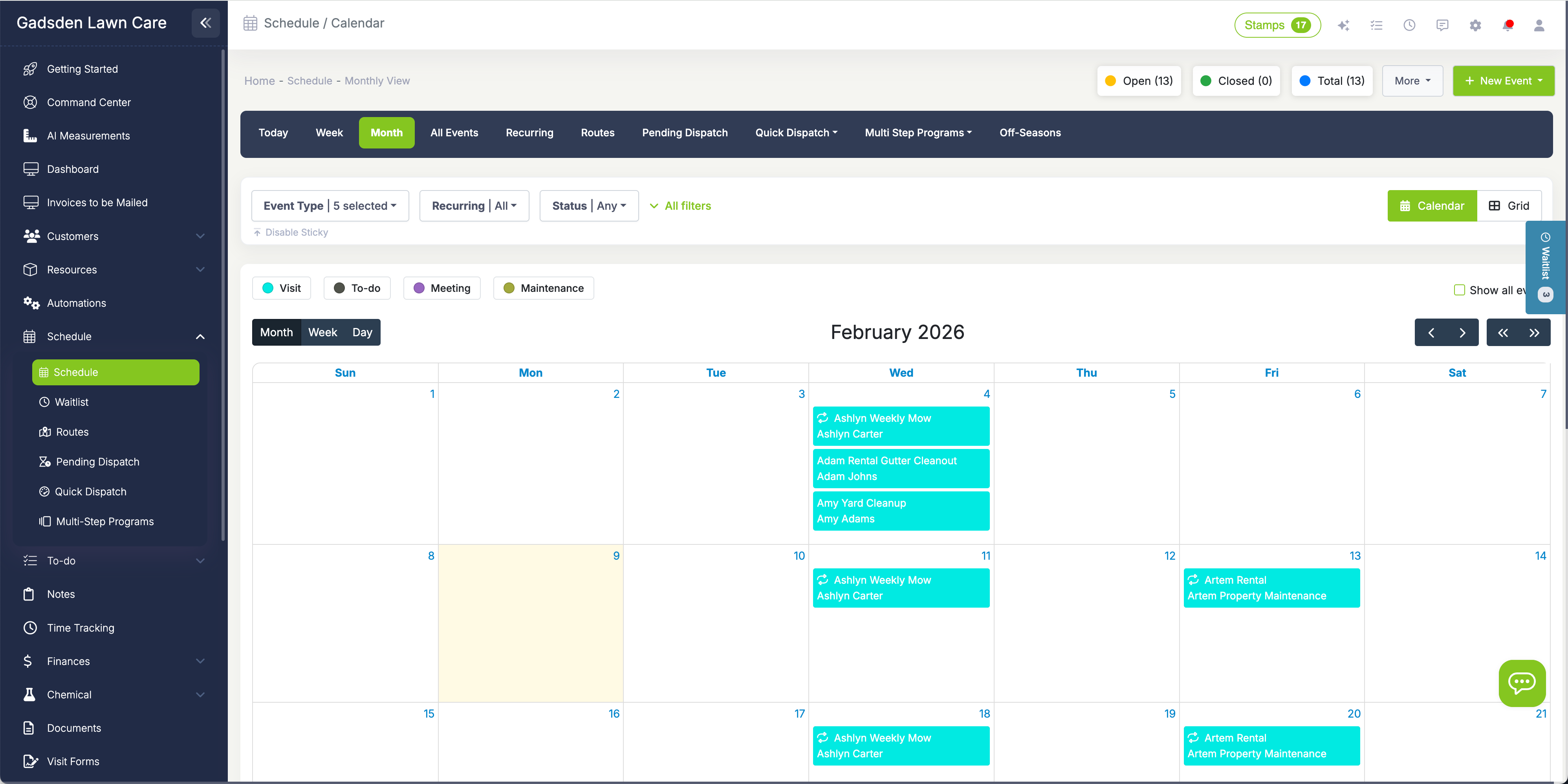
LawnPro Scheduling Calendar
40,000+ service businesses trust LawnPro 4.8 / 5 based on 7,531 reviews

Stop juggling spreadsheets and sticky notes

If you're still managing your schedule with paper calendars, Excel spreadsheets, or a whiteboard in the office, you're wasting hours every week—and risking costly mistakes. Double-bookings frustrate customers. Missed appointments cost you money. And when a crew member calls in sick, scrambling to reassign jobs becomes a nightmare.

LawnPro's scheduling software was built specifically for lawn care and field service businesses. Whether you're a solo operator managing 50 weekly mowings or a growing company with multiple crews handling hundreds of jobs, our calendar gives you a clear, real-time view of your entire operation. You'll always know who's working where, what's coming up next, and whether you have capacity to take on more work.

Best of all, your team sees their schedule on the mobile app—so they arrive prepared, complete jobs faster, and you spend less time answering "where am I going next?" phone calls.

LawnPro Calendar Overview

How scheduling works in LawnPro

From one-time service calls to complex recurring programs, LawnPro handles it all.

Create one-time visits in seconds

Need to schedule a one-time cleanup, a spring mulch job, or a quick service call? Creating a single visit takes just a few clicks. Navigate to your schedule, click "New Visit," select the customer and property, add the services you'll be performing, and assign it to a crew member or employee.

You can also set the estimated duration so your calendar reflects realistic time blocks, choose a custom color to visually distinguish different job types, and add notes or instructions that your team will see on their mobile app when they arrive on site.

If the customer has specific time requirements—like "must be done before 2pm"—you can set appointment times and LawnPro will hold that slot. Your crew gets all the details they need: address, contact info, services to perform, and any special instructions.
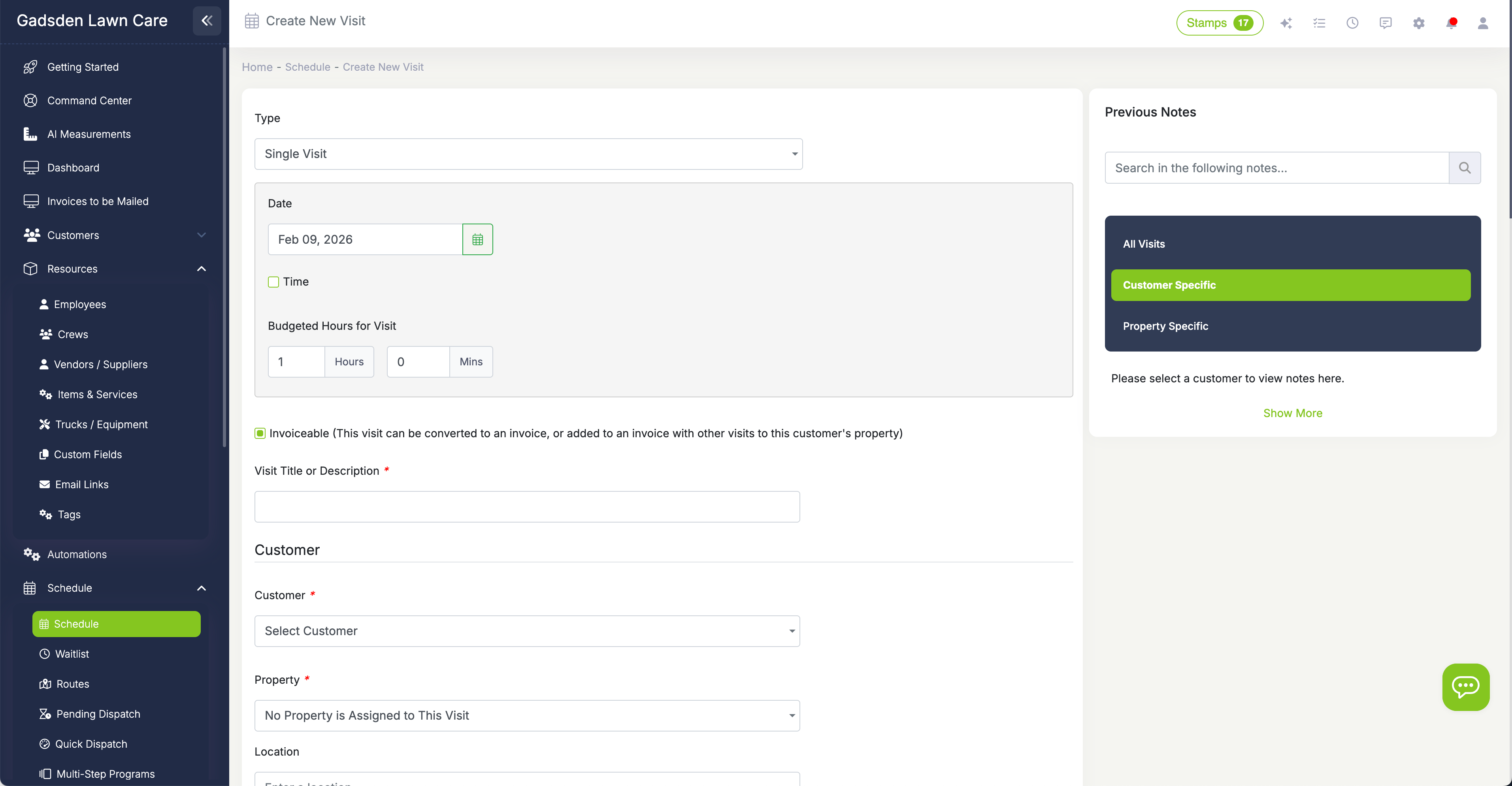
Create Single Visit

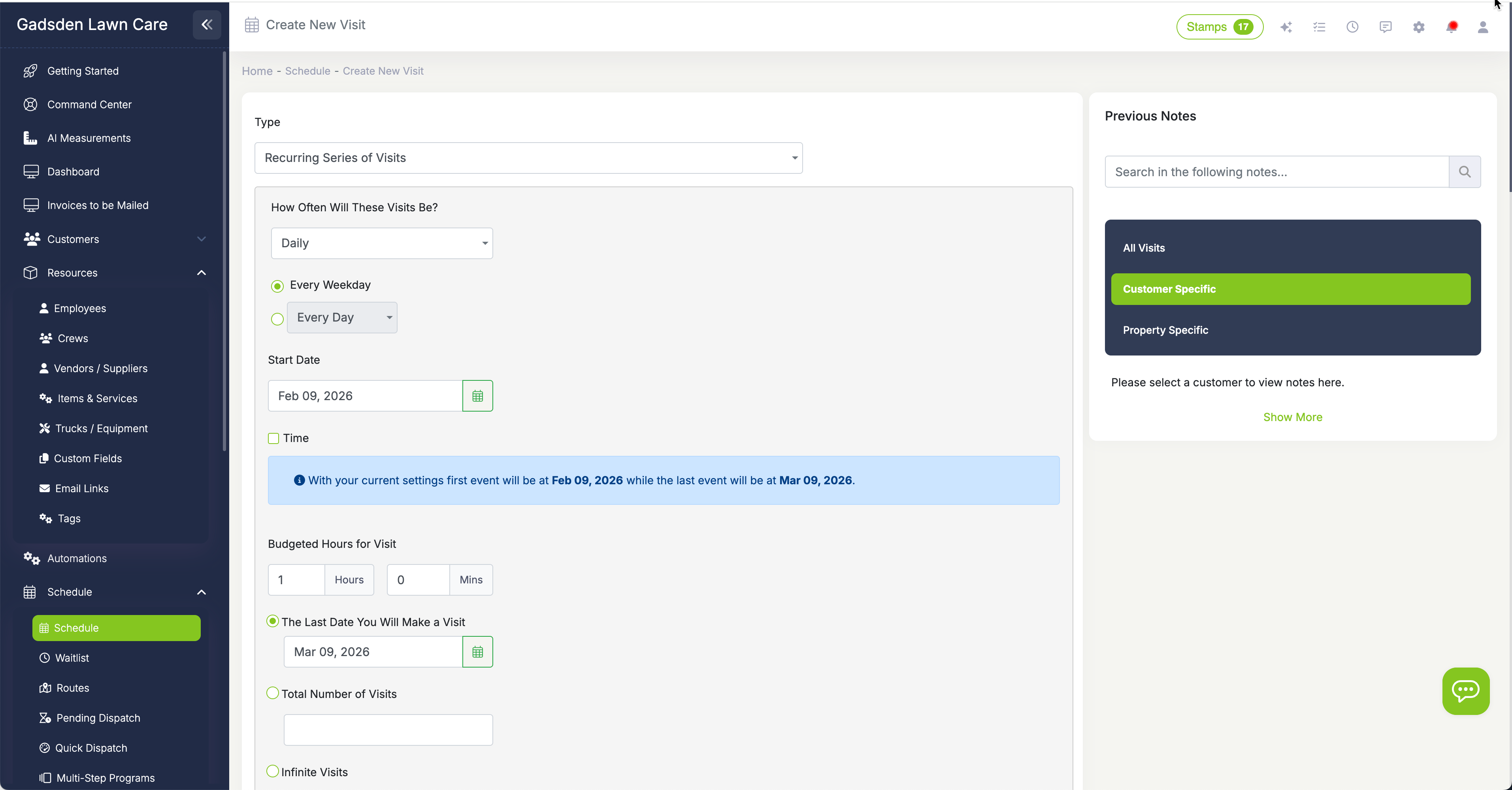
Set up recurring visits that run on autopilot

Most lawn care revenue comes from recurring services—weekly mowing, bi-weekly maintenance, monthly fertilization. Instead of manually creating dozens of visits, set up a recurring series once and LawnPro generates all future visits automatically.

Choose from flexible frequencies: Daily (every weekday or every X days), Weekly (select specific days like Monday/Wednesday/Friday), Bi-Weekly, Monthly (on a specific date or "the 2nd Tuesday"), or Yearly for annual services.

Set a start date and optionally an end date—or let it run indefinitely. When seasonal changes come, use our Seasonal Pause feature to temporarily stop visits without losing the recurring pattern. When spring arrives, unpause and all your visits resume exactly where they left off.

Need to reschedule one visit in a recurring series? Just drag it to a new date. LawnPro will ask if you want to move just that one visit or shift all future visits in the series—giving you complete control.

Recurring Visit Series

Multiple views to see your schedule your way

Different situations call for different views. LawnPro gives you multiple ways to see your calendar so you always have the perspective you need:

Day View: See every visit scheduled for a single day, broken down by time slots. Perfect for dispatch and checking crew availability.

Week View: Get a high-level look at your entire week. Quickly spot gaps in your schedule or days that are overbooked.

Month View: Plan ahead and see the big picture. Great for identifying seasonal patterns and scheduling future work.

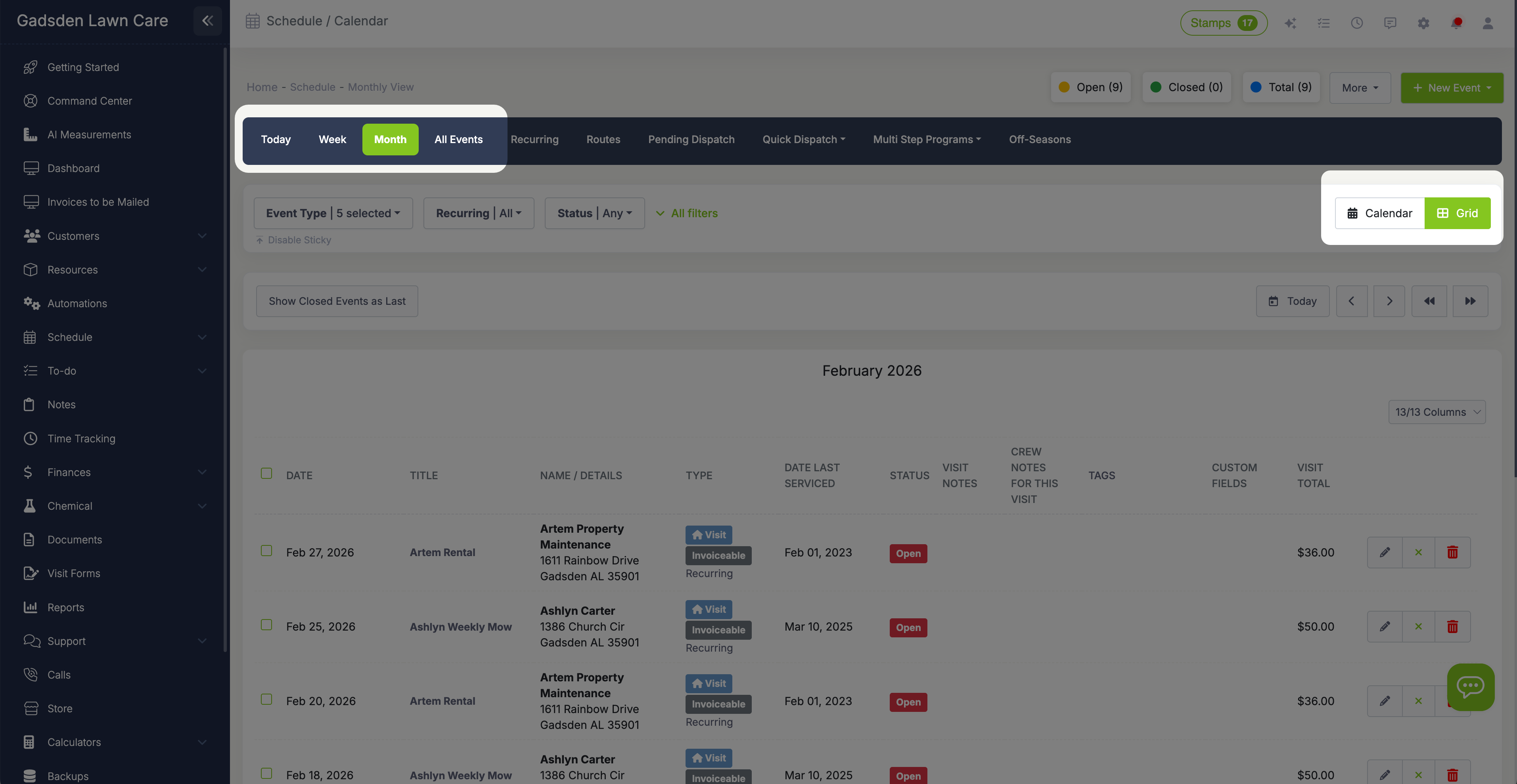
Grid View: A list-style view that shows all visits with details. Ideal for batch operations—select multiple visits and close them, invoice them, or reschedule them all at once.

Drag and drop works in every view. Need to move a job from Tuesday to Thursday? Just click, drag, and drop. Your crew gets notified automatically if their schedule changes.

Calendar Views

Assign work to crews and filter by team

When you have multiple crews in the field, knowing who's doing what becomes critical. LawnPro lets you create crews (like "Crew A - Mowing" or "Crew B - Landscaping"), assign employees to those crews, and then assign visits to the appropriate team.

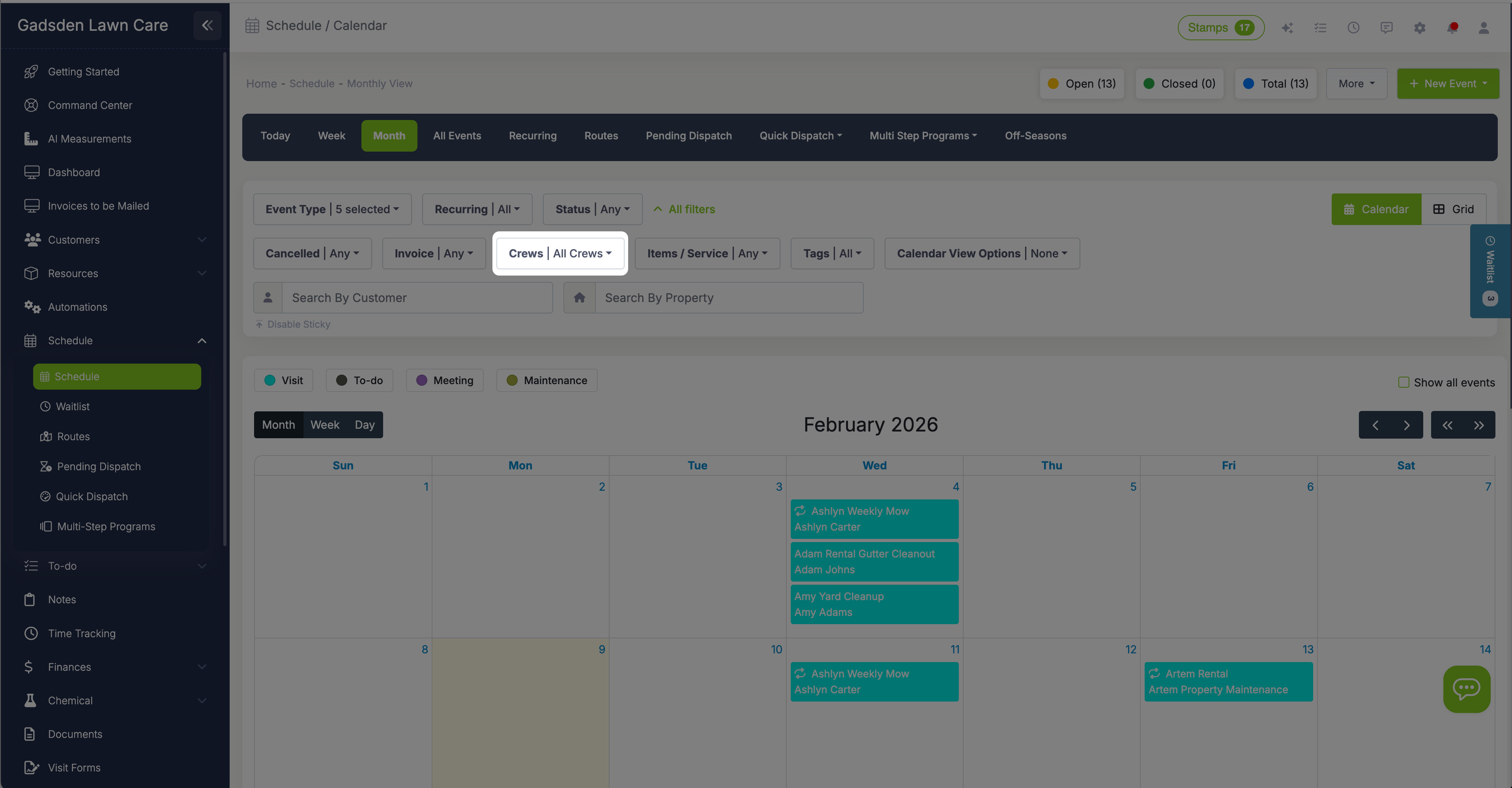
Use calendar filters to show only one crew's schedule at a time. This is especially useful when you're dispatching or when a crew lead wants to see just their team's jobs for the day without the clutter of other crews.

You can also compare schedules side-by-side to see who has availability when you need to fit in a last-minute job. If a crew member calls in sick, quickly reassign their visits to another available team member—LawnPro will notify them instantly via push notification on their phone.

In your Scheduler Preferences, you can control which days of the week are available for scheduling. If you don't work Sundays, tell LawnPro to exclude them entirely so you never accidentally book a job on your day off.

Filter by Crew

Close visits and create invoices without leaving your calendar

The best part of finishing a job should be getting paid—not spending 20 minutes on paperwork. LawnPro connects your schedule directly to invoicing so you can close visits and bill customers in one fluid motion.

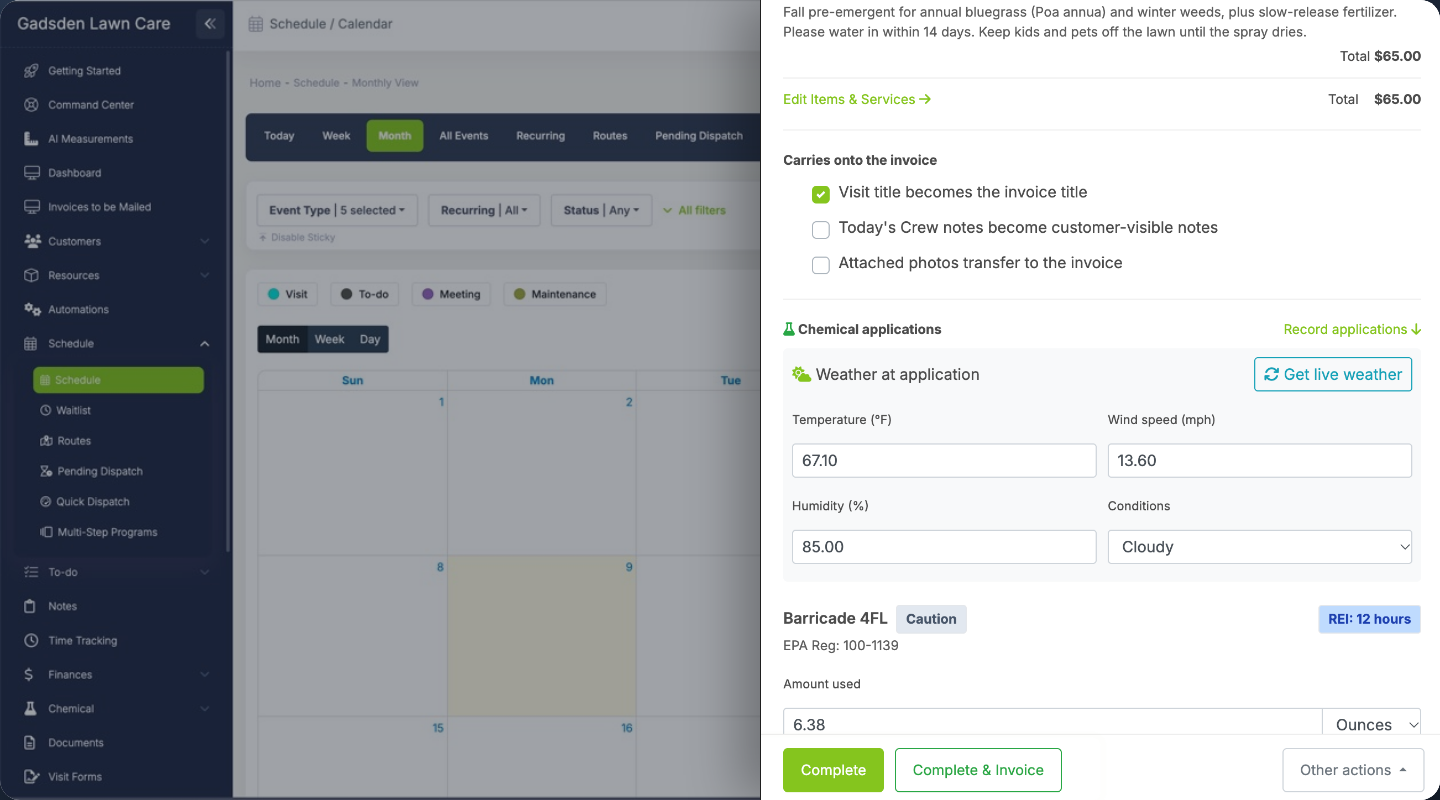
When your crew completes a job, they can mark it done from the mobile app. Or, from the office, click on any visit and hit "Complete & Invoice"—LawnPro automatically creates an invoice with all the services and prices already filled in.

For batch operations, switch to Grid View, select multiple completed visits, and close them all at once. Based on your settings, LawnPro can group all of a customer's visits onto a single invoice, create separate invoices per visit, or add visits to an existing unpaid invoice.

Once invoices are created, you can send them immediately via email, text message, or even USPS mail. Customers click a link to view and pay online—no phone calls, no checks to deposit. You get paid faster, and your books stay accurate.

Close and Invoice

Advanced Scheduling Features

Go beyond basic scheduling with powerful tools designed for growing businesses.

Multi-Step Programs

For services like fertilization, pest control, or seasonal lawn care programs, you need to schedule multiple visits in a specific sequence. Multi-Step Programs let you create templates with defined steps—like "Round 1: Pre-emergent" and "Round 2: Fertilizer"—then assign them to customers and generate all the visits automatically. Track completion status, generate professional program reports, and keep customers informed about their service schedule.

Learn More About Multi-Step Programs
Waitlist Estimates

When your schedule is full but you don't want to turn away good work, use the Waitlist. Approved estimates can be held in a queue until you have capacity. When a spot opens up—maybe a customer cancels or you hire a new crew member—pull from your waitlist and schedule instantly. No lost leads, no forgotten opportunities. You maintain control of your capacity while keeping potential revenue in the pipeline.

Learn More About Waitlist Estimates
Seasonal Pause

Lawn care is seasonal in most parts of the country. When winter hits, you don't want to delete all your recurring visits—you just want to pause them until spring. Seasonal Pause lets you temporarily stop a recurring series without losing any of the setup. When the season changes, unpause with one click and all your visits resume on their original schedule. No rebuilding, no re-entering data.

Learn More About Seasonal Pause

Why lawn care pros love LawnPro scheduling

Save hours every week

Stop wasting time with phone calls, texts, and whiteboard shuffling. Create, update, and communicate schedules in a fraction of the time. Most users report saving 5-10 hours per week on scheduling alone.

Eliminate double-bookings

See your entire team's availability at a glance. When you assign a job, you'll know immediately if there's a conflict. No more apologizing to customers because two crews showed up—or worse, no one did.

Crews always know where to go

Your team sees their schedule on the LawnPro mobile app—complete with addresses, customer notes, services to perform, and turn-by-turn directions. No more morning meetings to hand out paper route sheets.

Handle changes on the fly

Rain delay? Customer cancellation? Sick crew member? Drag and drop to reschedule, reassign visits with a click, and notify affected parties automatically. Flexibility is built into every feature.

Know if you can take more work

Before you say yes to a new customer, quickly check your calendar to see if you have capacity. Identify gaps in your schedule and fill them with profitable work instead of guessing.

Get paid faster

Close visits and create invoices directly from your calendar. The faster you invoice, the faster you get paid. LawnPro connects scheduling to payments so nothing falls through the cracks.

Pick the best plan for your business

Scheduling is included in all LawnPro plans. Start with a free trial—no credit card required.

View Pricing

Ready to take control of your schedule?

Join 40,000+ field service businesses who use LawnPro to manage their crews and grow their operations.

Start Free Trial

Learn More

Dive deeper into LawnPro scheduling with these help articles and guides.

Single & Recurring Visits

Step-by-step guide to creating one-time visits and setting up recurring series with all the frequency options explained.

Read Article
Schedule & Calendar Overview

Learn about all the calendar views, how to move events, manage recurring series, and handle seasonal pauses.

Read Article
Scheduler Preferences

Configure which days to allow scheduling, how to handle off-days, and other settings to customize your calendar.

Read Article

Explore related features

Scheduling works hand-in-hand with these other LawnPro tools.

Routing & Optimization

Once your schedule is set, optimize your routes to reduce drive time and fuel costs. See visits on a map and reorder them for maximum efficiency.

Time Tracking

Track how long jobs actually take versus your estimates. Employees can clock in/out from the mobile app with GPS verification.

Invoicing

Close visits and create invoices with one click. Send by email, text, or mail. Accept credit cards and ACH online.

Multi-Step Programs

Schedule entire fertilization, pest control, or seasonal programs with one click. Track completion and generate customer-facing reports.

Waitlist Estimates

When your schedule is full, hold approved estimates on a waitlist. Pull from the queue when capacity opens up.

Workflow Automations

Automatically notify customers about upcoming visits, send "on my way" messages, and follow up after jobs are complete.