Lawn care and landscaping estimate software that wins more jobs
Measure the lawn by satellite, build the estimate from your services, and send it by email or text. Customers approve, decline, or request changes in their portal, pay a deposit, and choose optional add-ons. Accepted work goes straight to scheduling without re-entering a thing.
From estimate to scheduled work in four steps
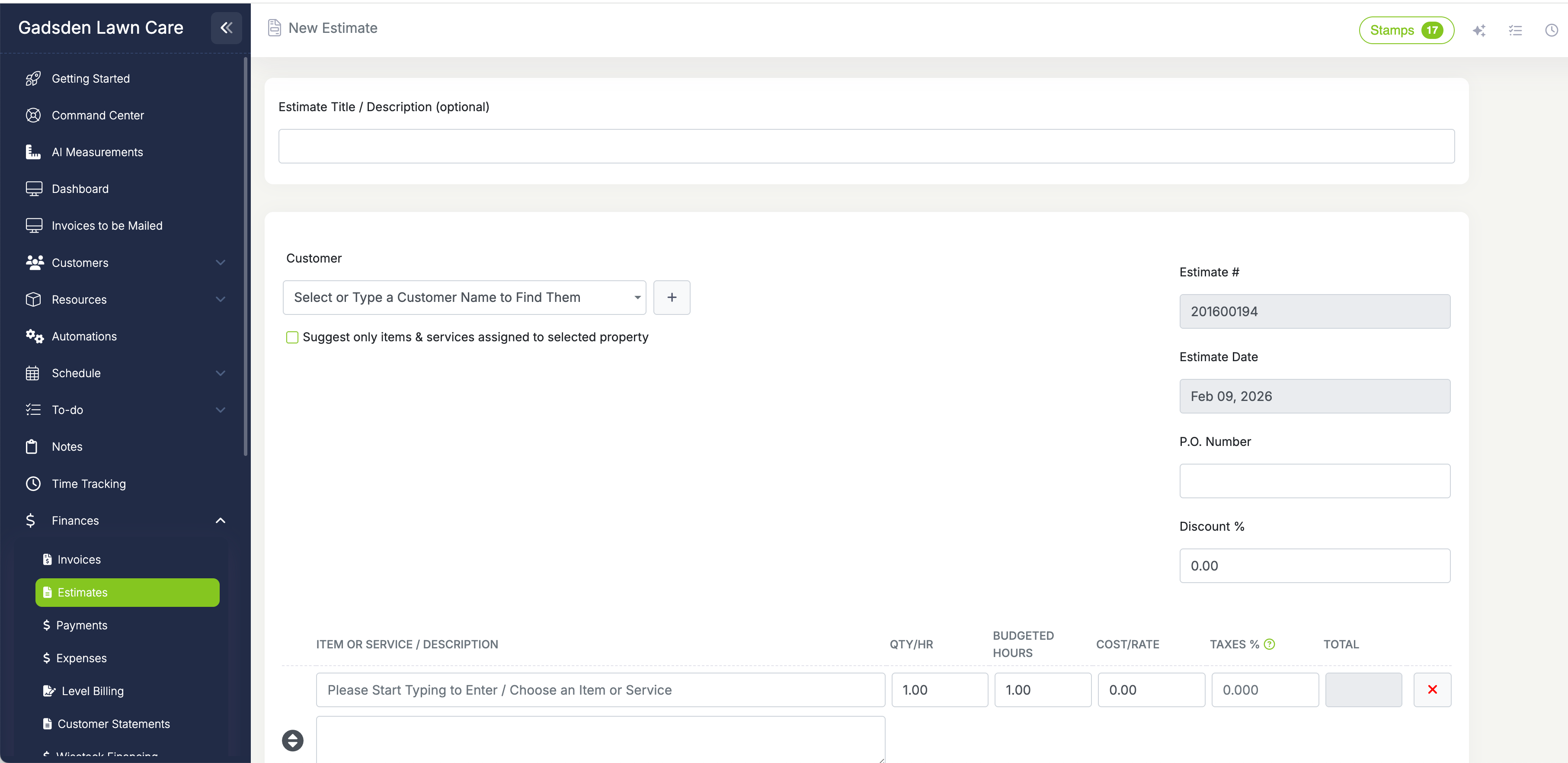
Add your services, set your prices, attach everything they need
Select a customer, add line items from your items and services catalog, and adjust prices if needed. Add optional items the customer can choose to include; each one has a checkbox that updates the total when selected. Attach photos and PDF documents, or record a video walkthrough on the Grow and Plus plans. Add terms and notes that pull from your defaults or customize them per estimate. Internal notes stay visible only to your team. Custom fields let you capture anything else you need to track.
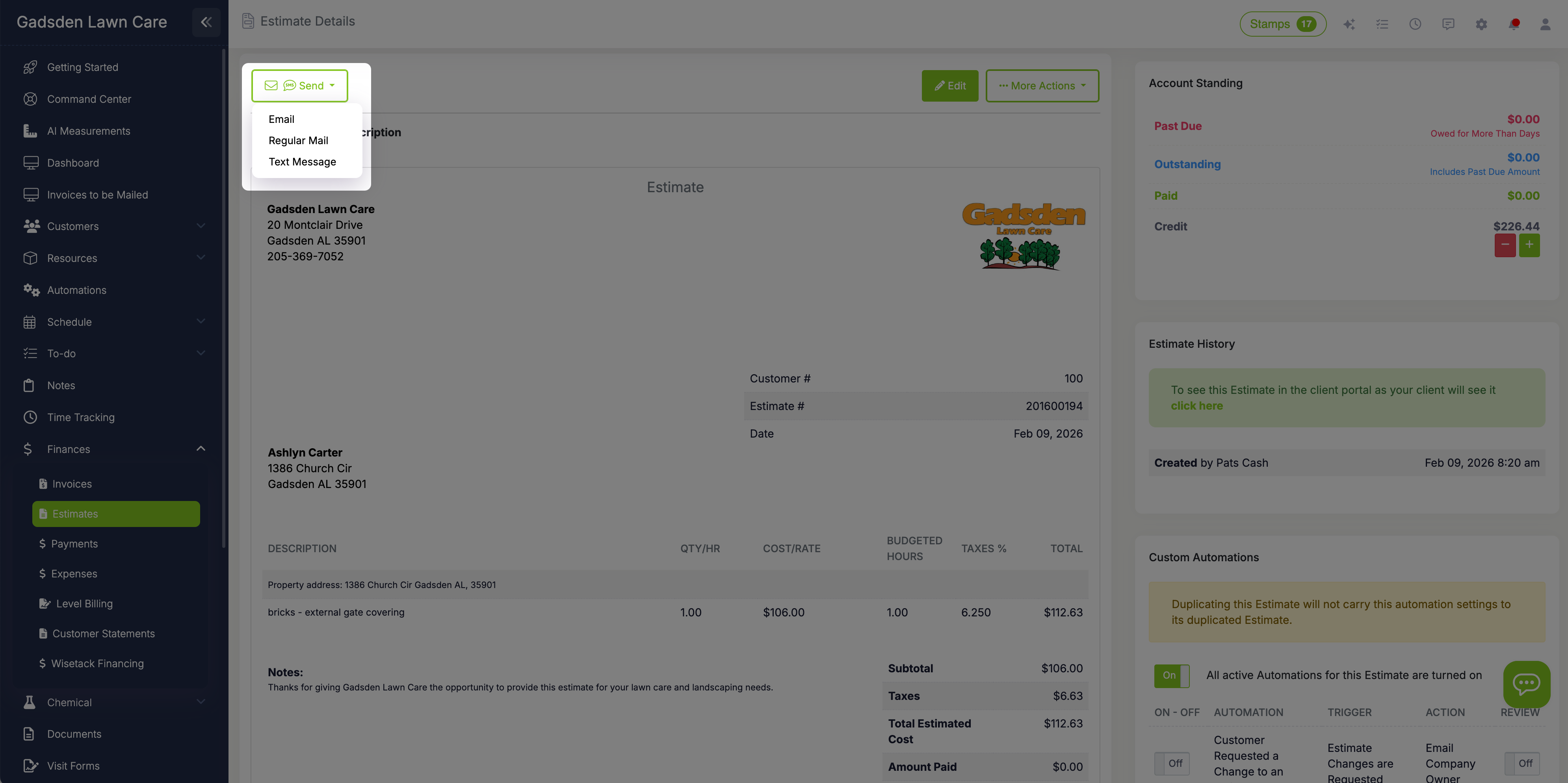
Email or text, with a PDF if they want one
Send estimates by email, with or without a PDF attached, or by text message. Your default email and text templates keep the wording and branding consistent, and you can set a different text template or PDF preference for individual customers. Printing one to mail or hand-deliver? Mark it as sent so your follow-ups still run. Estimates land in the customer's client portal where they can review every detail, view attached photos, and respond.
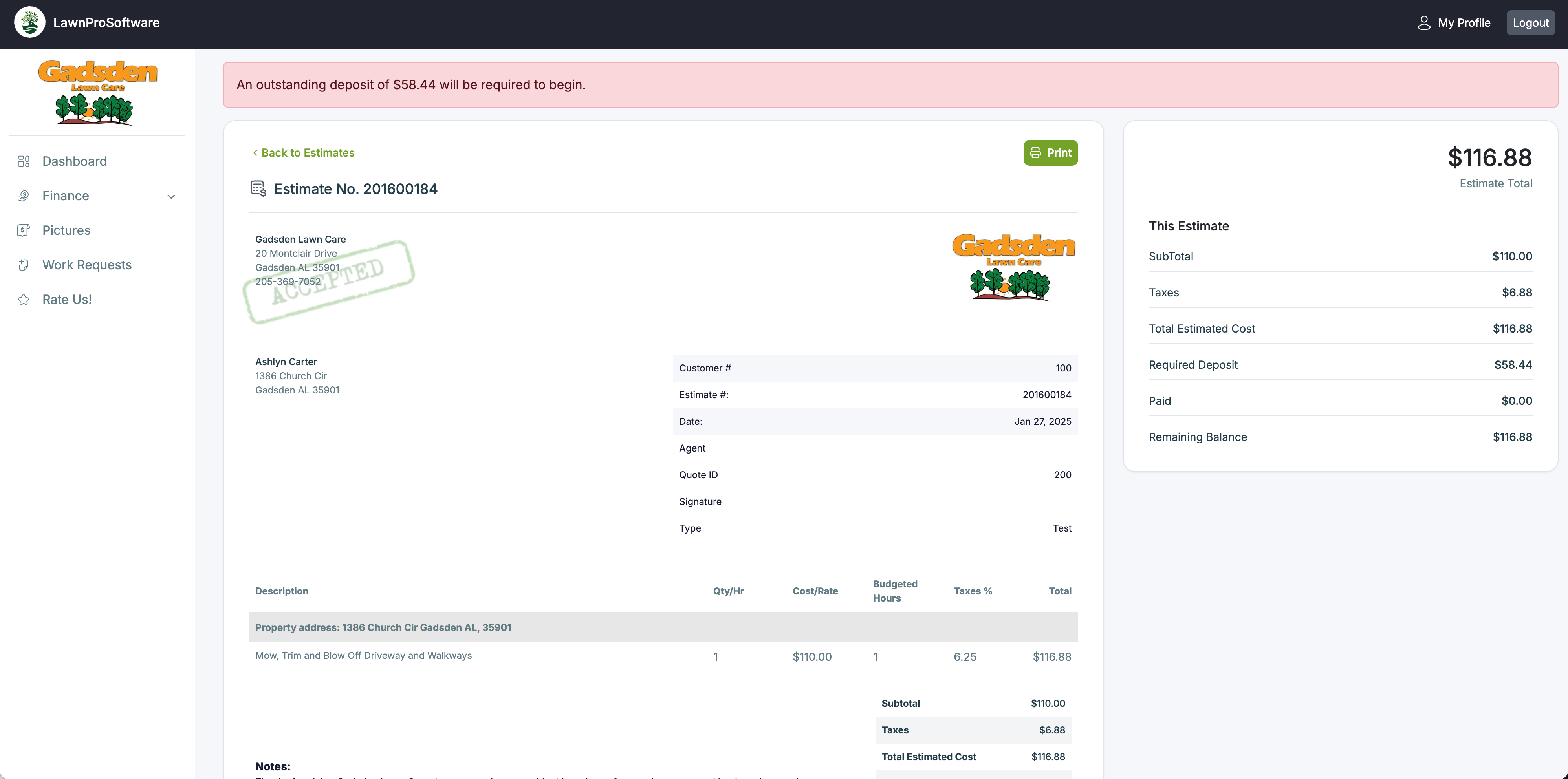
Customers accept, decline, or request changes online
Your customer opens the estimate in their portal and sees the full breakdown—line items, optional add-ons, terms, photos, and total. They click Approve to accept the work, Decline to pass (with a reason, so you know why), or Request Changes to ask you to revise something. With Wisetack financing turned on, they see an "as low as" monthly payment and can prequalify right from the estimate. If you require a deposit, they can pay it immediately by card or PayPal, or by bank transfer if you accept ACH.
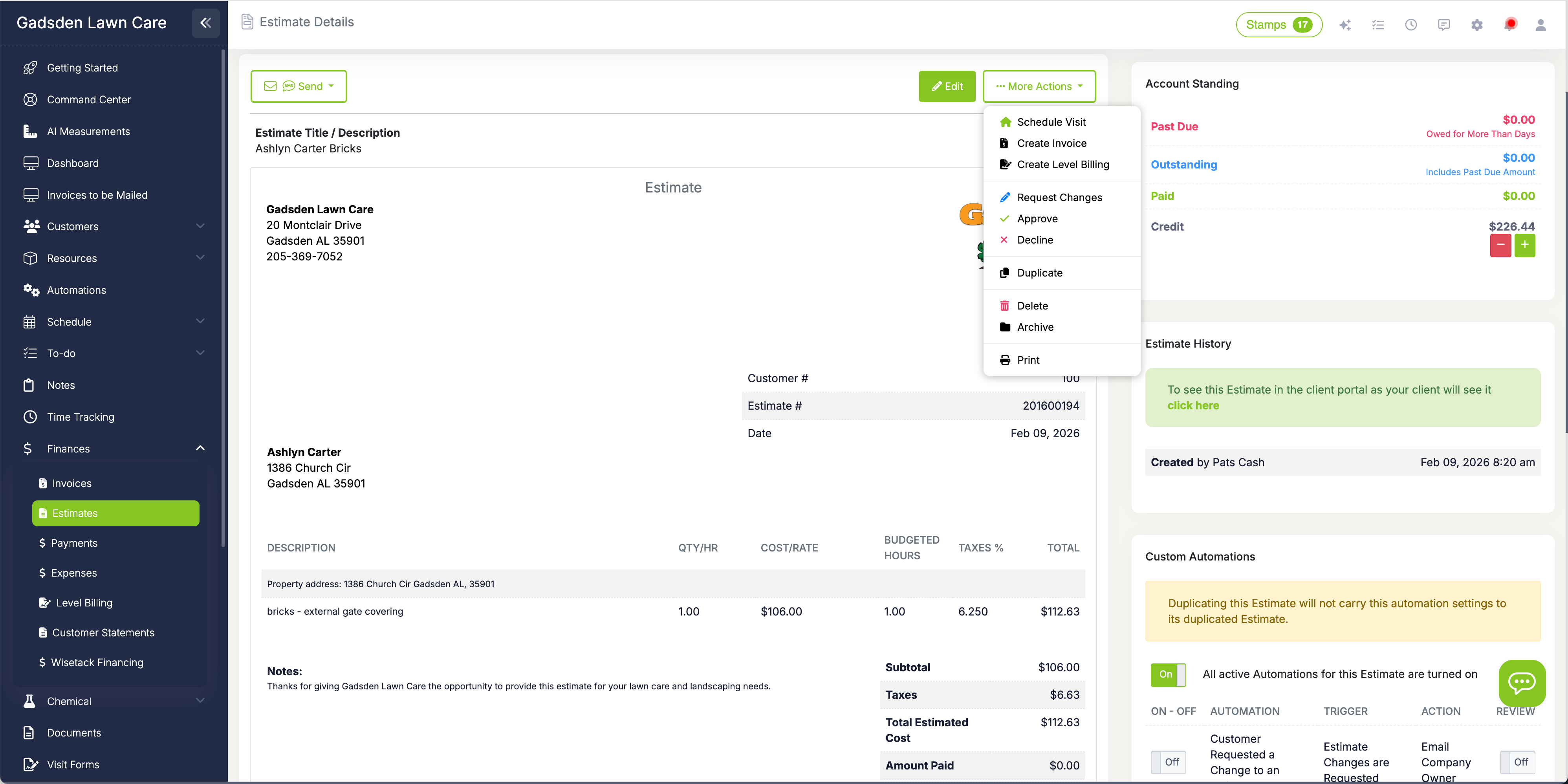
Convert accepted estimates to visits—all at once or item by item
Accepted estimates automatically appear on your waitlist (included on Grow and Plus) alongside other unscheduled work. Schedule the entire estimate as a single visit, or schedule individual line items on different days when the work needs to happen across multiple visits. Customer info, property details, and pricing all carry over automatically. When every item on an estimate is scheduled, it clears from the waitlist on its own.
Measure properties without a site visit
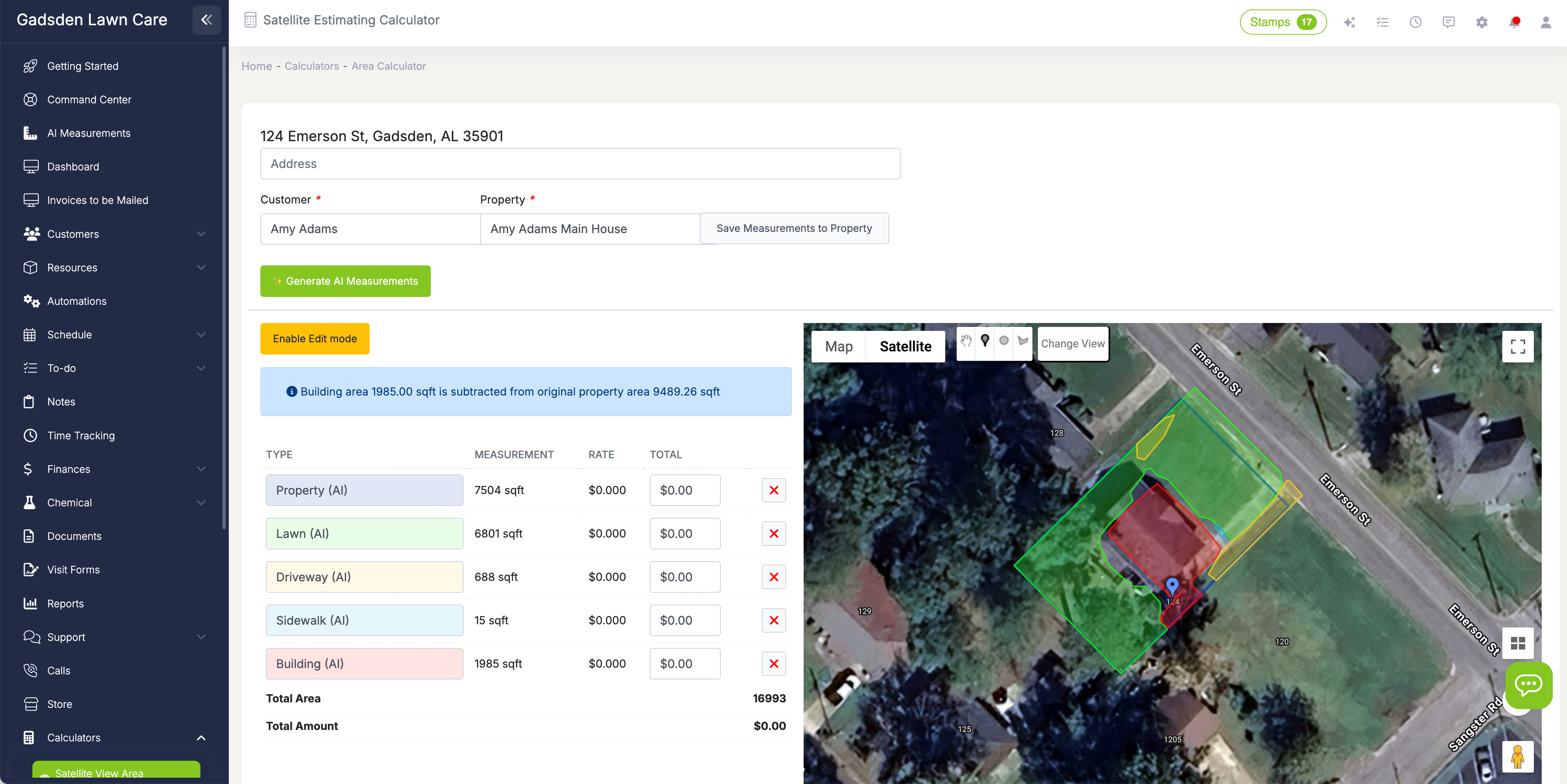
The satellite area calculator, included on every plan, lets you measure any property from your desk using aerial imagery. Type in an address or select an existing customer property, click the corners of the area you want to measure, and LawnPro calculates the square footage instantly. Enter your rate per square foot and the total price is calculated for you.
Need to subtract a building or driveway? Draw that area separately and subtract it from the total. Choose your measurement units—feet, yards, meters, or acres—and set your decimal precision. Save measurements directly to the property record so they're available for future estimates. Prefer not to draw it yourself? AI Measurements, a pay-per-use add-on, measures the turf for you.
We used to lose track of accepted estimates all the time—someone would say yes and then we'd forget to schedule it. Now everything lands on the waitlist automatically. We can even schedule one line item at a time for bigger projects. It completely changed how we handle new work.
LawnPro Customer
Everything you need to close more jobs
LawnPro estimates go beyond a simple price quote. Every tool you need to bid, win, and schedule work is built in.
Optional Add-On Items
Add optional line items with checkboxes that let the customer choose to include them or leave them off. The total updates automatically. Included on Grow and Plus; a $10/month add-on on other plans.
Deposit Collection
Require a deposit, as a percentage or a flat amount, before work begins. When the customer accepts in their portal, they pay it right there, and it is added to their account as a credit. Available on paid plans.
Satellite Measurements
Measure property areas from aerial imagery without a site visit. Click corners to calculate square footage, enter your rate, and get an instant price. Subtract buildings and save measurements to the property.
Consumer Financing
Show customers an "as low as" monthly payment from Wisetack on your estimates and let them prequalify right there, while you get paid upfront. Removes the price barrier on larger landscaping projects.
Waitlist Integration
Accepted estimates land on your waitlist automatically. Schedule the whole estimate at once or schedule individual line items on different days. When everything is scheduled, it clears itself from the list.
Estimate Automations
Set up automations that run when an estimate is sent, accepted, declined, or changes are requested. Follow up automatically with customers who haven't responded, or text your team when a job is approved.

Your customer's experience matters
When a customer opens your estimate in their portal, they see a clean, professional breakdown of every service, the price for each line item, and any optional add-ons they can include. Photos and documents you attached are right there for reference.
They respond with one click: Approve, Decline, or Request Changes. If financing is available, they see that option too. If you require a deposit, they can pay it on the spot. No phone calls, no back-and-forth emails. You get a notification the moment an estimate is accepted, and automations can alert you to declines and change requests.
What is estimate software for lawn care?
Estimate software for lawn care lets you create, send, and track bids for new work without paper forms, spreadsheets, or manually typed emails. You build an estimate with your services and prices, send it to the customer, and they respond online. The software tracks which estimates are pending, accepted, declined, or waiting for changes—so nothing falls through the cracks.
LawnPro's estimating tools include a satellite area calculator that lets you measure areas and calculate prices without a site visit, optional add-on items that let customers select extra services with a checkbox, deposit collection for larger jobs, and Wisetack consumer financing for customers who want to pay over time. Estimates are sent by email or text, and customers approve, decline, or request changes from their client portal.
Once a customer accepts an estimate, it appears on your waitlist alongside other work waiting to be scheduled. You can convert the entire estimate to a visit, or schedule individual line items on separate days for multi-service projects. Automations can follow up with customers who haven't responded, notify your team when work is approved, or trigger any other action based on the estimate's status. From bid to scheduled visit, the entire workflow stays inside LawnPro.
Lawn care estimate FAQ
Go to Finances > Estimates and add a new estimate. Name it, pick the customer, add line items from your services catalog, and adjust prices. Terms and notes fill in from your defaults, and internal notes stay visible only to your team. Send it by email, with an optional PDF attached, or by text. To mail or hand-deliver a printed copy, mark it as sent so your follow-ups still run.
Yes. Customers open the estimate in their client portal and click Approve, Decline (with a reason), or Request Changes. You get an in-app and mobile notification when an estimate is accepted, and automations can email or text you when one is declined or changes are requested. Approval is a click in the portal, recorded in the estimate history; LawnPro does not collect an e-signature on estimates.
Yes. The satellite area calculator, included on every plan, lets you draw an area on aerial imagery, subtract buildings or driveways, apply your rate per square foot, and save the measurements to the property. AI Measurements can measure the turf for you from satellite imagery instead; it is a pay-per-use add-on.
Optional items are add-on services, like mulching or aeration, that appear with a checkbox. When the customer checks one in their portal, the subtotal, tax, and total update. Optional items are included on the Grow and Plus plans and are a $10/month add-on on other plans.
Yes, on paid plans. Require a deposit as a percentage or a flat amount, and the customer pays it in the portal by card or PayPal, or by bank transfer if you accept ACH. The deposit is added to the customer's account as a credit toward the work.
Accepted estimates that have not been scheduled appear on the waitlist. Schedule the whole estimate as a visit, or schedule individual line items on different days; the estimate leaves the waitlist once every item is scheduled. The waitlist is included on Grow and Plus and is a $10/month add-on on other plans.
Yes. With Wisetack financing, available on paid plans, the estimate shows an "as low as" monthly payment and the customer can prequalify right from it, while you are paid upfront.
Yes. Set an automation on "Estimate is Sent" with a delay of a few days; it is skipped if the customer has already responded. Automations can also run when an estimate is accepted, declined, or changes are requested. On Grow and Plus, the Estimate Follow-Up sequence sends a series of reminders that stops when the customer responds.
Yes. Estimates, the client portal, and the satellite area calculator are included on the free Solo plan for up to 25 customers. Deposits and Wisetack financing need a paid plan, which starts at $39/month.
Explore more features
See what else LawnPro can do for your business.
Photos & Videos
Capture before and after photos and video walkthroughs on every job, and share them with customers.
Waitlist Estimates
See all accepted estimates waiting to be scheduled in one place. Schedule everything at once or item by item.
Client Portal
Give customers a branded portal to view estimates, pay invoices, submit work requests, and manage their account.
Resources
Help Articles
Step-by-step guides on creating, sending, and managing estimates.
Estimate Help Articles →Video Tutorials
Watch how to build estimates, use the satellite calculator, and more.
Watch Videos →