Help Article
Setting Up Tip Collection
Step-by-step guide to enabling tips in your Client Portal.
Read Now →Tip collection built into your payment flow. Customers see 10%, 15%, 20%, and custom options when paying invoices in the Client Portal. No extra steps, no awkward asks—just an easy way to reward great work.

When a customer views an invoice in your Client Portal, the tip section appears right on the payment form—after they see the invoice amount and before they submit payment. No popups, no extra clicks. Everything is on one clean page so customers can review, add a tip, and pay in seconds.
Start Free Trial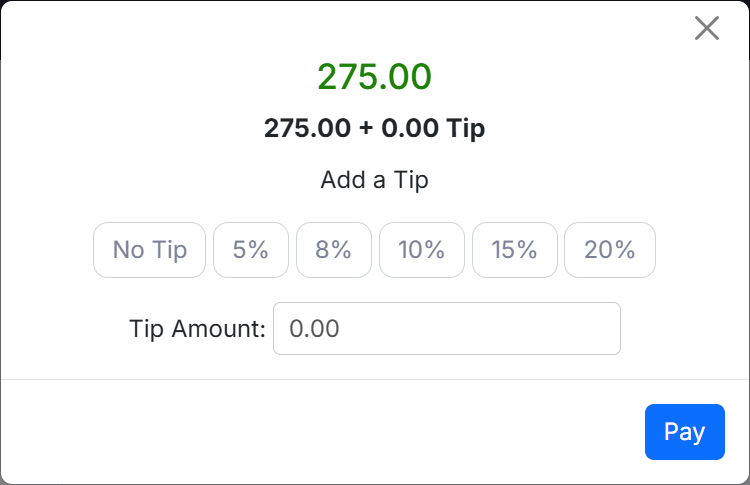
Customers choose from 10%, 15%, or 20% with a single tap. Want to tip more? The custom option lets them enter any amount. The 15% option is selected by default—research shows this sweet spot maximizes tips without feeling pushy.
Start Free Trial
Every tip is recorded with the payment but tracked separately so you can see exactly how much each crew earned in tips. Run reports by date range, crew, or employee. Makes distributing tips to your team straightforward and transparent.
Start Free Trial
Use the "Payment Made With Tip" automation trigger to send a personalized thank-you to customers who tip. Acknowledge their generosity immediately—it encourages repeat tipping and strengthens customer relationships.
Start Free TrialTip Collection is included in all LawnPro plans. No credit card required to start.
View Pricing"Our crews love it. Tips went from almost nothing to an extra $200-300 per week just because customers have an easy way to show appreciation. And the thank-you automation makes customers feel good about tipping."
Boost crew morale and earnings without awkward conversations.
Tips add meaningful income for your team. Happy crews stick around longer and do better work.
Tips are part of the payment flow—not a separate step. Customers add tips without extra effort.
15% is pre-selected based on industry research. Customers can easily change it or skip entirely.
Some customers want to tip more. The custom option lets them enter any dollar amount they choose.
See tips by date, crew, or employee. Makes payroll distribution simple and keeps things transparent.
Trigger automations when customers tip to send immediate thank-you messages. Gratitude breeds loyalty.
Tip Collection connects seamlessly with your existing LawnPro workflow.
Customers see tip options when paying invoices online. The same clean payment experience, now with tips.
Learn More →Use "Payment Made With Tip" trigger to send thank-you emails or texts automatically.
Learn More →Track tip totals by date range, crew, or employee. Export for payroll or analysis.
Learn More →Tip Collection is a feature in LawnPro that allows customers to add a gratuity when they pay invoices through your Client Portal. The tip options appear naturally on the payment form—right on the same page as the invoice, so customers can see the amount, add a tip, and pay without any popups or extra steps.
When enabled, customers see preset tip buttons for 10%, 15%, and 20%, plus a custom option for entering any amount. The 15% option is selected by default, which research shows maximizes tips without feeling aggressive. Customers can easily change their selection or remove the tip entirely.
Here's what Tip Collection includes:
Tips are collected through your existing payment processor (Stripe) and deposited with your regular payments. The tip amount is tracked separately so you can easily see what each crew earned and distribute tips fairly.
Absolutely. Customers can deselect the tip option or set a custom amount of $0. The tip section is clearly optional and never blocks payment. We never want customers to feel pressured.
No. Tips are automatically hidden for estimate deposits since the work hasn't been completed yet. Tips only appear when customers pay invoices for completed work.
Tips are tracked separately from invoice payments. You can run reports filtered by date range, crew, or employee to see tip totals. This makes distributing tips to your team straightforward.
Tips are processed through your regular payment processor (Stripe) at the same rate as your invoice payments. There are no additional LawnPro fees for collecting tips.
Currently the default is 15%, which research shows balances maximizing tips with customer comfort. Customers can easily select a different percentage or enter a custom amount.
Guides and support to help you run your business better.
Step-by-step guide to enabling tips in your Client Portal.
Read Now →See how customers experience paying invoices with tip options.
Watch Now →Questions about tips or payments? We're here 7am-7pm CST, 7 days a week.
Contact Us →