Your services price themselves.
Set pricing tiers for each service based on property square footage, then let LawnPro calculate the right price automatically. Adjust for difficulty, frequency, and overflow—your estimates come out accurate every time without manual math.
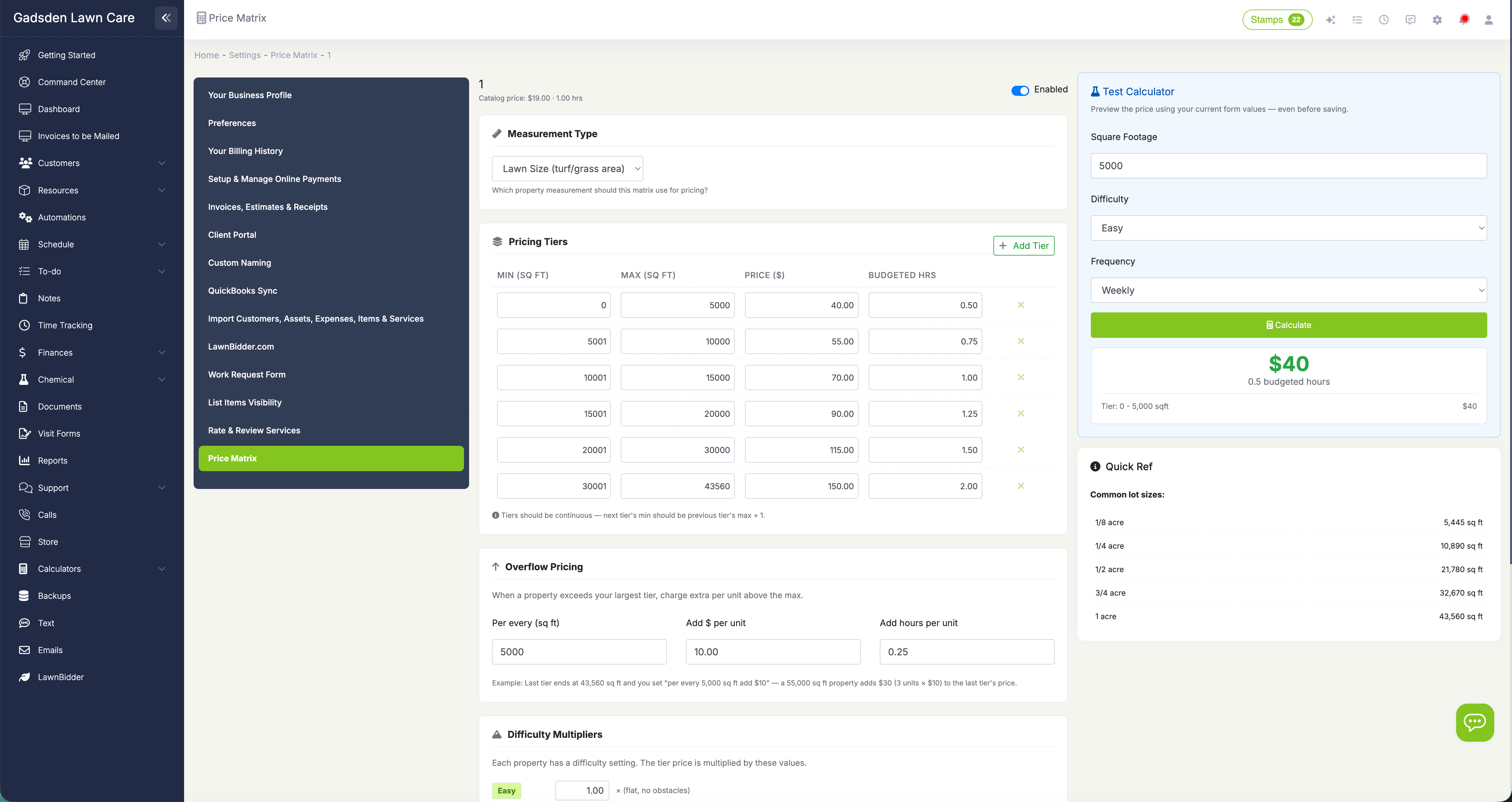
Set up once, price every estimate automatically
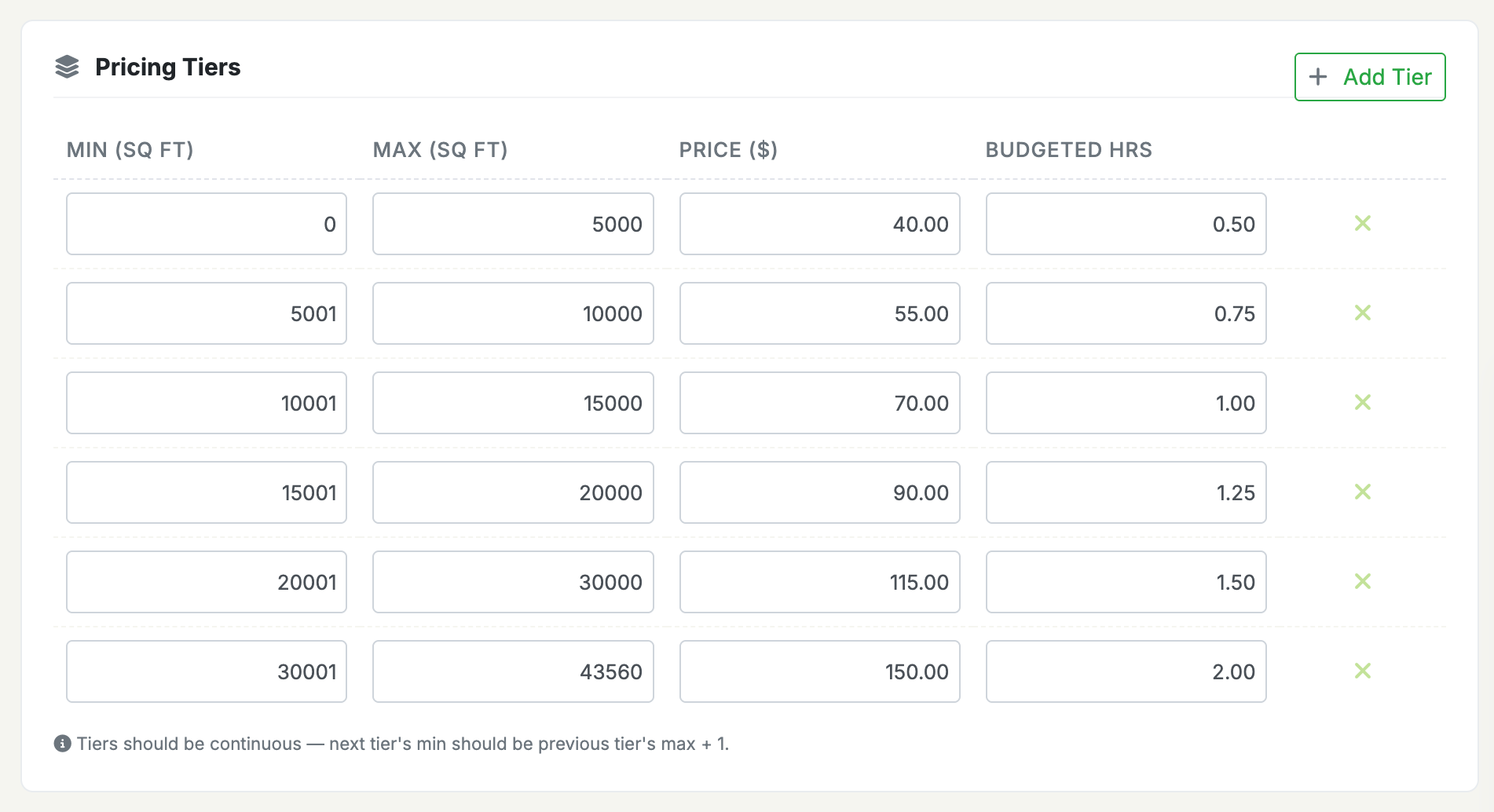
Different sized properties, different prices—automatically
Define pricing tiers for each service based on property square footage. A 5,000 sq ft lawn might cost $35 to mow while a 20,000 sq ft lawn costs $70. Set as many tiers as you need with a price and budgeted hours for each range. When a property's lawn size falls within a tier, the system knows exactly what to charge. You can also configure overflow pricing for properties that exceed your last tier—every additional 5,000 sq ft over 43,560 adds $10 more, for example. Each service gets its own tier table so mowing, fertilization, and aeration all have pricing that reflects the actual work involved.
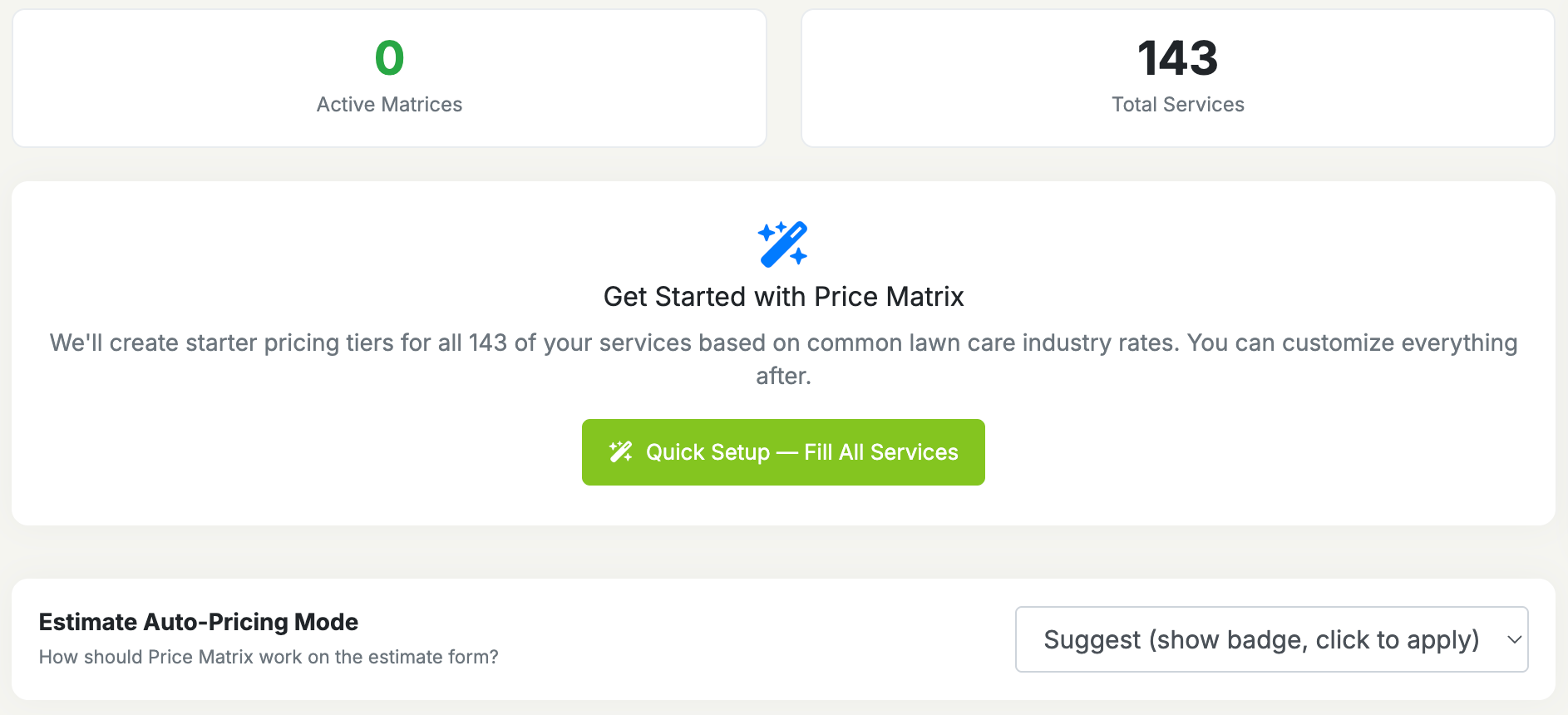
One click fills pricing for all your services
Don't want to build every tier table from scratch? Hit Quick Setup and LawnPro creates starter pricing for all your services at once using industry-standard rates. The system reads your service names and matches them to the right preset—mowing gets mowing rates, fertilization gets fertilization rates, aeration gets aeration rates. Nine service types are recognized automatically, and anything else gets a sensible default. After Quick Setup runs, click into any service to customize the tiers, adjust the difficulty multipliers, or change the frequency percentages. It takes 30 seconds to go from zero to fully configured pricing for your entire catalog.
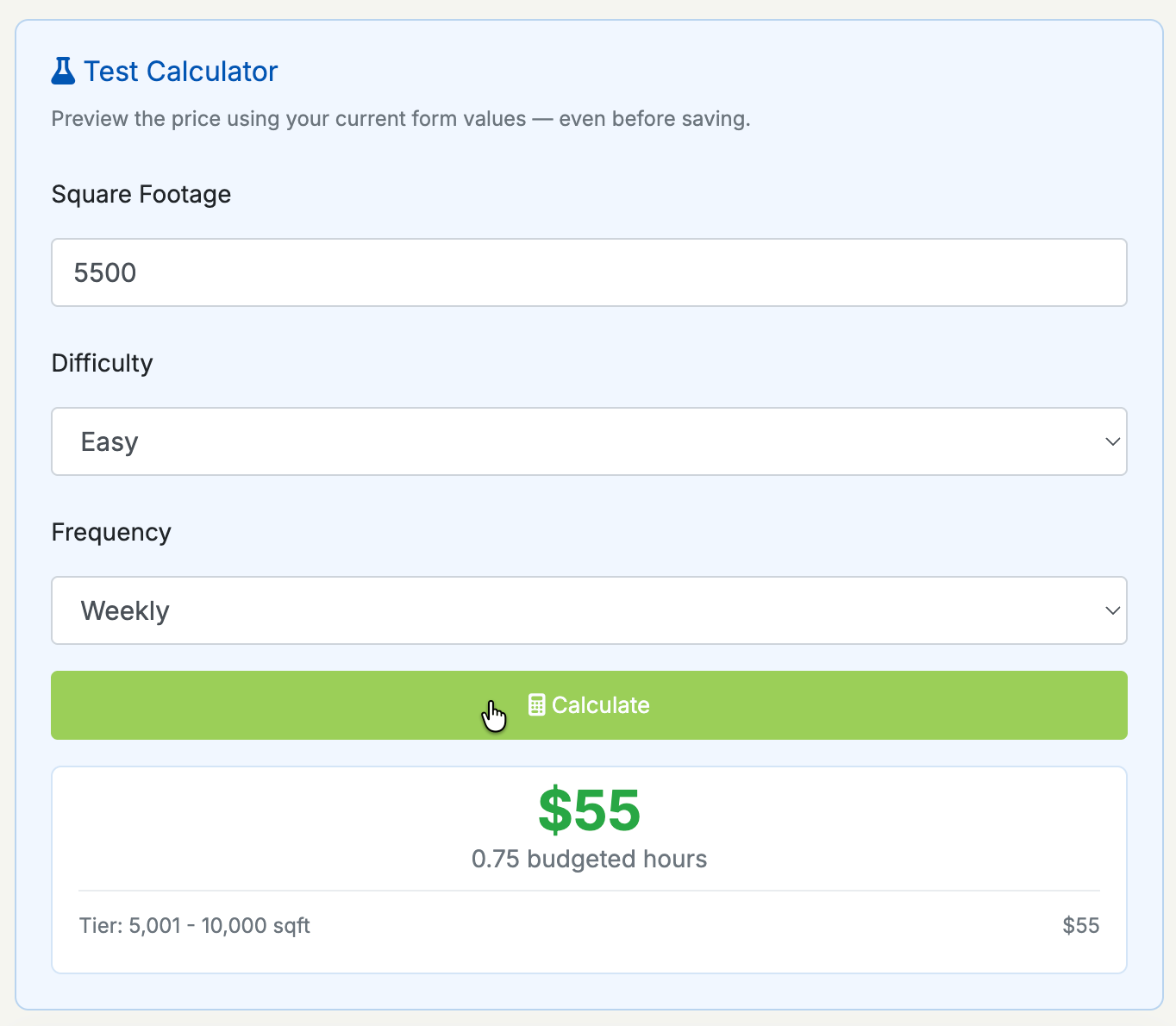
Difficulty and frequency adjust the final price
Not every 10,000 sq ft lawn is the same. A flat, open yard is easier than one with hills, obstacles, and tight fence lines. The difficulty multiplier lets you account for this: set easy at 1.0x, medium at 1.2x, and hard at 1.5x (or whatever fits your business). A $45 mowing tier becomes $54 for a medium property and $67.50 for a hard one. Frequency adjustments work similarly—a one-time service costs more than weekly recurring because of setup and travel inefficiency. Set a percentage markup for one-time, biweekly, and monthly visits while weekly stays at your base rate. The built-in test calculator shows you the exact price breakdown before you save, so you can dial in your numbers with confidence.

Estimates price themselves based on the property
When you create an estimate and select a service that has a Price Matrix configured, LawnPro looks at the property's lawn size and difficulty, finds the matching tier, applies the adjustments, and fills in the price. Choose between two modes: Suggest mode shows a badge next to the price field so you can review and click to apply, while Auto-Fill mode fills the price automatically as soon as you select the service. Either way, you can always override the price manually. The property's lawn size and difficulty are set on the property record under the asset details—enter them once and every future estimate for that property gets accurate pricing instantly.
How Price Matrix calculates your price
Three layers of intelligence turn a square footage number into a precise, profitable price.
Tier Lookup
The property's lawn size is matched to the correct pricing tier. A 12,000 sq ft lawn hits the 10,001–15,000 tier at $55. If the property exceeds the last tier, overflow pricing kicks in automatically.
Difficulty Multiplier
The property's difficulty rating adjusts the tier price. Easy stays at 1.0x, medium might be 1.2x ($66), and hard might be 1.5x ($82.50). You set the multipliers for your business.
Frequency Adjustment
One-time and less frequent visits get a percentage markup. A 25% one-time markup turns $66 into $82.50. Weekly stays at base rate because recurring work is your bread and butter.
We used to spend time on every estimate doing math in our heads. Now I set up the matrix once and every estimate comes out right. The Quick Setup feature had us running in under a minute—we just tweaked a few numbers and we were done.
LawnPro Customer
Why lawn care companies use Price Matrix
Most estimating means guessing a price and hoping you're profitable. Price Matrix removes the guesswork.
Stop Guessing Prices
No more eyeballing a yard and picking a number. The matrix gives you a consistent, profitable price based on actual measurements every single time.
New Employees Price Correctly
A new hire doesn't need years of experience to price jobs. They enter the lawn size, pick the service, and the system does the rest.
Protect Your Margins
Hard properties and one-time jobs cost more to service. Difficulty and frequency adjustments make sure you're not leaving money on the table.
Estimates in Seconds
Select a property, pick a service, and the price fills in. What used to take 5 minutes of calculator math happens instantly.
Quick Setup Gets You Started
One click creates pricing tiers for every service using industry rates. You're up and running in 30 seconds with defaults you can customize later.
Test Before You Commit
The built-in test calculator shows the exact price breakdown for any square footage, difficulty, and frequency combination—before you save.
What is a Price Matrix for lawn care?
A Price Matrix is a pricing system that replaces flat, one-size-fits-all service prices with tiered pricing based on property size. Instead of charging every customer $45 for a mow regardless of whether their lawn is 3,000 or 30,000 square feet, you define price ranges for different square footage brackets. When you create an estimate, the system looks at the property's measurement and returns the right price automatically.
LawnPro's Price Matrix goes further by layering in difficulty multipliers and frequency adjustments. A hilly, fenced-in property takes more time and effort than a flat, open one—even at the same square footage—so the difficulty multiplier adjusts the price accordingly. One-time and infrequent services cost more per visit than weekly recurring work, and frequency adjustments capture that difference automatically. The result is a pricing system that reflects the actual cost and effort of every job, not just an average.
Quick Setup gets you started in seconds by creating tier tables for all your services at once using industry-standard presets. The built-in test calculator lets you verify pricing for any combination of square footage, difficulty, and frequency before you save. And because the matrix integrates directly into the estimate workflow, your team gets accurate pricing without doing any math.
Frequently asked questions
A Price Matrix is a table of pricing tiers for a service, based on property square footage. Instead of one flat price for every customer, each property gets priced according to its actual size. You define the tiers (e.g., 0–5,000 sq ft = $35, 5,001–10,000 sq ft = $45), and LawnPro looks up the right price automatically when you create an estimate.
Your Items & Services catalog has a single flat price per service—every customer pays the same amount regardless of their property size. Price Matrix replaces that flat price with tiered pricing based on square footage. The catalog price becomes the fallback when there's no matrix configured or no property measurement.
Quick Setup creates pricing matrices for all your services at once. It reads your service names, matches them to industry-standard tier presets (mowing, fertilization, aeration, etc.), and creates the tiers automatically. You can customize any of them afterward. It's designed to get you from zero to fully configured in under a minute.
The lawn size is stored on the property's asset record. You enter it manually when adding or editing a property. In the future, AI-powered measurement tools will be able to fill this in automatically from just an address.
Yes—every service gets its own independent tier table. Mowing might have tiers from $35–$120, while aeration has tiers from $75–$250. Difficulty multipliers and frequency adjustments are also set per service.
Overflow pricing handles this. You configure how much to add for each additional block of square footage beyond the last tier. For example, "every 5,000 sq ft over 43,560 adds $10 more." The system calculates the overflow automatically.
Absolutely. The matrix suggests or fills in a price, but you can always change it on the estimate. The matrix is a starting point—not a hard rule.
In Suggest mode, a badge appears next to the price field showing the calculated price—you click it to apply. In Auto-Fill mode, the price fills in automatically when you select the service. Choose the mode that matches your workflow in Settings > Price Matrix.
Explore more features
See what else LawnPro can do for your business.
Estimates
Create professional estimates, send them to customers, and convert accepted quotes to scheduled jobs with one click.
Budgeted Hours
Set time targets for every job and track how your crews perform against them to improve profitability.
Invoicing
Create and send branded invoices, accept online payments, and automate past-due reminders.
Resources
Help Articles
Step-by-step guides on setting up Price Matrix, configuring tiers, and using Quick Setup.
Price Matrix Help Articles →Video Tutorials
Watch how to set up pricing tiers, test the calculator, and see estimates auto-fill in action.
Watch Videos →